How High Should Your Desk Be When Sitting? Complete Setup Guide

We’ve all been there: hunched over a desk that feels just a bit too low, or perched awkwardly high with our shoulders practically touching our ears. Getting your desk height right isn’t just about comfort (though that’s certainly part of it). It’s about protecting your body from the kind of sneaky, long-term damage that builds up when you’re spending eight hours a day in the wrong position.
The truth is, most people never think twice about how high their desk should be. They sit down at whatever furniture came with their office or home setup and assume that’s just how it is. But your desk height can make the difference between ending your workday feeling energized or feeling like you’ve been hit by a truck.
Why Desk Height Matters More Than You Think
Let’s talk about what happens when your desk height is off. When your workspace sits too high, your shoulders creep upward, creating tension that radiates down your back and into your neck. You might not notice it immediately, but by week three of that setup? You’re probably wondering why you’ve got a headache that won’t quit and shoulders that feel like concrete.
On the flip side, a desk that’s too low forces you to hunch forward. Your spine curves in ways it definitely wasn’t designed for, and your wrists bend at awkward angles as you reach down to your keyboard. This position compresses your chest, making it harder to breathe deeply, and puts enormous strain on your lower back. Some people end up with carpal tunnel symptoms or that annoying pins-and-needles feeling in their hands.
The right desk height keeps your body in what ergonomists call a “neutral position.” Your shoulders stay relaxed, your elbows bend at roughly 90 degrees, and your wrists stay straight as you type. This position reduces muscle fatigue, improves circulation, and helps you maintain focus for longer periods. When your body isn’t fighting against your furniture, you actually have more energy for, you know, getting work done.
The Golden Rule: How to Calculate Your Ideal Desk Height
Here’s where things get practical. The optimal desk height isn’t some one-size-fits-all number (sorry, furniture manufacturers). It’s based on your height and your body’s proportions.
When you’re sitting properly, your feet should rest flat on the floor. Your thighs should be parallel to the ground or angled slightly downward. And here’s the crucial part: when you place your hands on your keyboard, your elbows should form a 90 to 110-degree angle, with your forearms roughly parallel to the floor.
For most people between 5’8″ and 5’10”, a standard desk height of 28 to 30 inches works reasonably well. But if you’re taller or shorter than that range, the standard desk height probably isn’t doing you any favors. Someone who’s 6’2″ might need a desk closer to 32 inches high, while someone who’s 5’3″ might be most comfortable at 26 inches.
The exact math involves measuring from the floor to your elbow while you’re seated with your feet flat and your upper arms hanging naturally at your sides. Add an inch or two to that measurement, and you’ve got your ideal desk surface height. This accounts for the thickness of your keyboard and gives you that sweet spot where your wrists stay neutral.
Quick Reference: Desk Height by Your Height
| Your Height | Recommended Desk Height | Ideal Chair Height |
|---|---|---|
| 5’0″ – 5’3″ | 24″ – 26″ | 15″ – 17″ |
| 5’4″ – 5’7″ | 26″ – 28″ | 16″ – 18″ |
| 5’8″ – 5’11” | 28″ – 30″ | 17″ – 19″ |
| 6’0″ – 6’3″ | 30″ – 32″ | 18″ – 20″ |
| 6’4″ and up | 32″ – 34″ | 20″ – 22″ |
These are starting points, not hard rules. Bodies vary, and what feels perfect for one person at 5’10” might feel slightly off for another person the same height. Trust your body’s feedback.
Gaming Desks: Does Your Setup Need Different Heights?
Gaming introduces its own quirks to the desk height equation. Many people wonder how high their desk should be for gaming, and the answer depends partly on what kind of games you play.
Competitive gamers often prefer a slightly lower desk height than the standard ergonomic recommendation. This allows for a more aggressive arm position with your mouse arm extended further forward, which some players find gives them better precision and faster reaction times. We’re talking maybe an inch or two lower than what you’d use for office work.

For casual gaming or when you’re switching between gaming and other computer tasks, sticking with the standard ergonomic height makes more sense. Your body still needs proper support, especially during those marathon gaming sessions that stretch into the early morning hours.
The bigger consideration for gaming setups is often monitor height and distance. Your screen should sit at eye level or slightly below, about an arm’s length away. If you’re using a gaming monitor with a higher refresh rate, maintaining good posture becomes even more important because you’re likely to be sitting there longer than you planned (just one more round, right?).
Some adjustable height desks give you the flexibility to switch between sitting and standing positions, which can be a game-changer for those long sessions. Being able to stand up for a bit without leaving your game can actually help maintain your focus and reduce fatigue.
The Chair Height Connection You Can’t Ignore
Here’s something people often miss: you can’t figure out the right desk height without also considering your chair. These two pieces of furniture work together as a system, and getting one right while ignoring the other is like trying to balance on one leg.
Your chair height should allow your feet to rest flat on the floor with your thighs parallel to the ground. If your chair is too high, you’ll feel pressure under your thighs and your feet will dangle. Too low, and your knees will sit higher than your hips, putting strain on your lower back.
Once you’ve got your chair adjusted correctly, then you can figure out if your desk needs to come up or down to meet your arms at the right angle. Many people make the mistake of adjusting their chair to match their desk height rather than the other way around. Don’t do that. Your relationship with the floor comes first, then everything else adjusts from there.
Ergonomic office chairs with good lumbar support help maintain that neutral spine position we talked about earlier. Look for chairs with adjustable seat height, depth, and armrests. The armrests should support your forearms lightly without pushing your shoulders up, and they should allow your arms to rest at that 90-degree angle when your hands are on your keyboard.
If your desk is too high and can’t be adjusted, a footrest can bridge the gap. It’s not quite as ideal as having everything at the perfect height, but it beats dangling your feet or sitting in a position that strains your back.
Monitor Placement: The Other Half of the Equation
Getting your desk height dialed in is only part of setting up an ergonomic workspace. Your monitor position plays an equally important role in preventing neck strain and eye fatigue.
The top of your screen should sit at or slightly below eye level. When you’re looking straight ahead, your eyes should naturally land on the address bar of your browser or the top third of your screen. This prevents you from tilting your head up (which compresses the back of your neck) or down (which strains the front).
Monitor distance matters too. Sit back in your chair and extend your arm. Your fingertips should just about touch the screen. This distance reduces eye strain and keeps you from hunching forward to see clearly. If you’re squinting or leaning in, either move the monitor closer or adjust your display settings.
For people using laptops, this creates a problem. When your laptop sits flat on your desk at the right height for typing, the screen is way too low. You end up looking down, which puts enormous strain on your neck and upper back. A laptop stand paired with an external keyboard and mouse solves this elegantly, letting you raise the screen to eye level while keeping your typing surface at the optimal height.
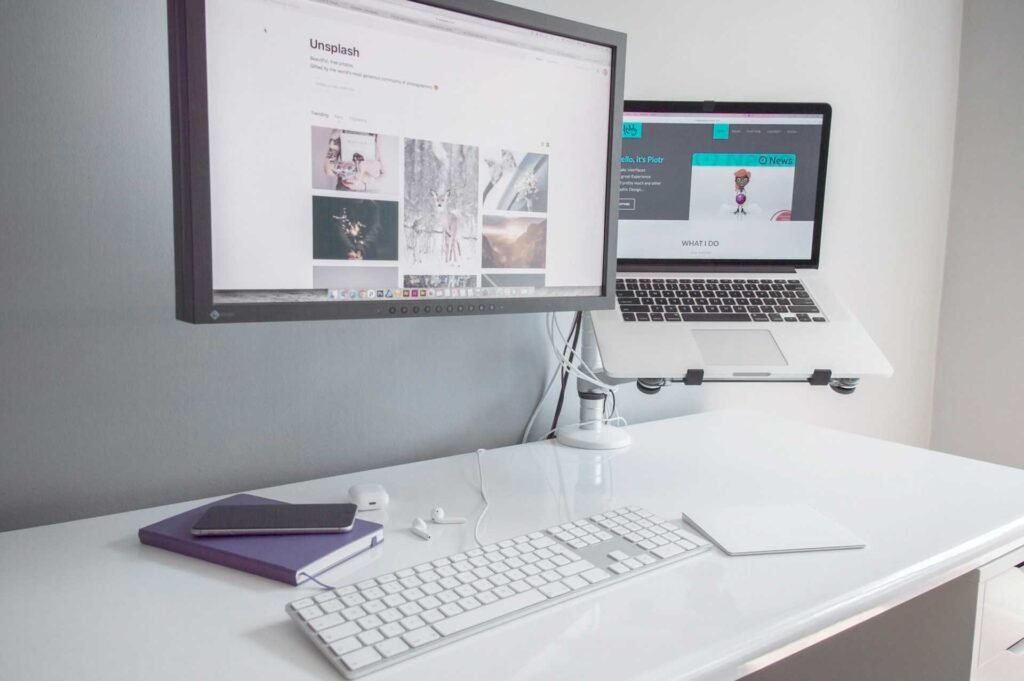
Some people also benefit from using monitor risers or adjustable arms that let you fine-tune the screen position independently of your desk height. This flexibility becomes especially valuable if multiple people use the same workspace or if you’re someone who likes to adjust your position throughout the day.
Standing Desks and Height Adjustability: Worth the Investment?
Adjustable standing desks have exploded in popularity, and for good reason. They let you switch between sitting and standing throughout the day, which keeps your body moving and reduces the negative effects of prolonged sitting.
When you’re standing at your desk, the height calculation changes. Your desk should sit at elbow height, maybe an inch or two below. Your arms should still form that 90 to 110-degree angle, but now you’re supporting your body weight through your legs rather than your chair.
The real magic of adjustable desks isn’t necessarily that standing is better than sitting (standing all day has its own problems). It’s that changing positions regularly keeps your muscles engaged and prevents the stiffness and discomfort that comes from staying static. Even just standing for 15 to 20 minutes every hour can make a significant difference in how you feel at the end of the day.
If you’re considering an adjustable desk, look for one with a good range of motion. It should go low enough for comfortable sitting (that 28 to 30-inch range for average heights) and high enough for standing (typically 40 to 50 inches). Electric adjustment is easier and more convenient than manual cranks, especially if you plan to change positions frequently.
One word of caution: don’t jump into standing for hours at a time. Your body needs to adapt. Start with short standing periods and gradually increase. Wearing supportive shoes or using an anti-fatigue mat makes standing more comfortable and sustainable.
Common Desk Height Mistakes That Might Be Wrecking Your Body
Even when people know about ergonomics, they often make subtle mistakes that undermine their efforts. Let’s run through some of the most common ones.
Using a desk that’s too high is incredibly common, especially for shorter people using standard-height furniture. When your desk sits too high, you end up shrugging your shoulders to reach your keyboard. This creates tension in your trapezius muscles and can lead to tension headaches. Your wrists also bend upward, which increases the risk of repetitive strain injuries.
Conversely, working at a desk that’s too low forces you into a hunched position. You might not notice it immediately because you’re focused on your screen, but that forward curve in your spine puts massive pressure on your lower back discs and strains the muscles along your spine. Over time, this can contribute to chronic back pain.
Another mistake? Adjusting your chair height to match a fixed desk rather than using a footrest if needed. Yes, getting your arms at the right height for your desk is important. But if that means your feet don’t touch the floor or your thighs are pressed against the chair seat, you’re creating problems elsewhere in your body.
Some people also forget about their keyboard and mouse. Even if your desk height is perfect, using a thick keyboard without a wrist rest can angle your wrists upward. Similarly, reaching too far forward for your mouse can strain your shoulder. Keep your keyboard and mouse close enough that your elbows stay near your body.
Working on a laptop without any accessories is probably the single most common ergonomic mistake. The screen is too low, the keyboard is fixed to that low screen, and you end up hunched over like you’re reading a book. If you work on a laptop for more than an hour a day, getting an external keyboard and mouse or a laptop stand should be a priority.
Making It Work: Solutions for Tricky Situations
Not everyone has the luxury of buying new furniture or working in a space where they can make major changes. Here are some practical workarounds for common situations.
If you’re working from a kitchen table or dining room table, these are typically 29 to 30 inches high, which is slightly taller than a standard desk. For most average-height people, this can work with a good adjustable chair. The key is getting a chair that can go high enough to put your arms at the right angle while still allowing your feet to reach the floor (with or without a footrest).

For shared workspaces where you can’t permanently adjust the furniture, consider keeping a few accessories in a drawer or bag. A portable laptop stand, a small keyboard, and a mouse don’t take up much space and can transform an awkward setup into something much more comfortable. You can set up and break down in just a minute or two.
If you’re stuck with a desk that’s too low and can’t modify it, raising your chair and using a footrest is your best bet. You want a footrest that’s stable and large enough for your feet to move around a bit. Being able to shift your foot position throughout the day helps prevent stiffness.
For people working from home who need their desk to do double duty (like folding up or serving as a dining table), folding laptop stands and wireless keyboards can bridge the gap between different uses. These accessories let you create an ergonomic setup quickly and pack it away just as fast.
When you’re temporarily working from somewhere with terrible ergonomics (a hotel room, a coffee shop), you can still minimize the damage. Take frequent breaks to stand and move around. Do some shoulder rolls and neck stretches. Use anything available (books, boxes) to raise your laptop screen closer to eye level, even if it’s not perfect.
FAQ
How do I know if my desk is too high or too low?
Your body will tell you, though sometimes the signs are subtle at first. If your shoulders feel tense and you notice yourself shrugging to reach your keyboard, your desk is probably too high. On the flip side, if you’re hunching forward or your lower back aches after sitting for a while, your desk might be too low. The ideal setup lets you sit with relaxed shoulders, elbows bent at about 90 degrees, and wrists straight while typing.
Can I use a standing desk all day instead of sitting?
Standing all day actually isn’t much better than sitting all day. Both create problems when you stay in one position too long. The real benefit of standing desks comes from alternating between sitting and standing throughout the day. This variation keeps your muscles engaged and prevents the stiffness that comes from staying static. Start with short standing periods (15 to 20 minutes) and gradually increase as your body adapts.
What if my desk height is fixed and can’t be adjusted?
You’ve got options even with a fixed desk. If the desk is too high, raise your chair and add a footrest so your feet don’t dangle. If the desk is too low, you can add risers under the desk legs to lift it up. Another approach is adjusting everything else around the desk: use an adjustable chair with good height range, position your keyboard and mouse at the optimal height with accessories, and use a monitor arm to position your screen correctly.
Does the type of work I do affect the ideal desk height?
Not as much as you might think. Whether you’re typing, using design software, or gaming, the basic ergonomic principles stay the same: elbows at 90 degrees, wrists straight, feet flat on the floor. Some competitive gamers prefer a slightly lower desk height for better mouse movement, but the difference is just an inch or two. The bigger variations come from your personal height and body proportions, not your work tasks.
How long does it take to adjust to a new desk height?
Most people notice a difference within a few days, though it can take a week or two for your body to fully adapt to better ergonomics. You might feel a little awkward at first if you’ve been using poor positioning for a long time. Your muscles are used to compensating in certain ways, and they need time to learn the new pattern. Stick with it because the initial weirdness fades quickly, and the long-term benefits are worth it.
Should I invest in an ergonomic assessment?
If you’re dealing with chronic pain or discomfort that doesn’t improve with basic adjustments, a professional ergonomic assessment can be valuable. An occupational therapist or ergonomics specialist can spot subtle issues you might miss and provide personalized recommendations. For most people, though, following basic ergonomic guidelines and listening to your body’s feedback is enough to create a comfortable workspace.
Wrapping It All Up: Your Body Will Thank You
Getting your desk height right might seem like a small detail, but it’s one of those things that compounds over time. Sit at the wrong height for weeks or months, and those small strains add up to real problems. Get it right, and you remove a constant source of stress on your body.
The good news? You don’t need expensive equipment or major renovations to make meaningful improvements. Sometimes it’s as simple as adjusting your chair height, adding a footrest, or propping up your monitor with a few books. Other times, investing in an adjustable desk or better chair makes sense, especially if you’re spending significant time at your workspace.
Remember that perfect ergonomics isn’t about rigidly following rules. It’s about creating a setup that supports your body and adapts to your needs. Listen to what your body tells you. If something hurts or feels uncomfortable, that’s valuable information. Make small adjustments and give them a few days to see if they help.
And here’s a final thought: your relationship with your desk is like any other relationship. It takes some effort to figure out what works, and what’s comfortable might change over time. Maybe you’re standing more now than you did six months ago. Maybe that chair that felt perfect last year doesn’t quite hit the spot anymore. That’s normal. Stay curious about what makes you comfortable, and be willing to make changes when something isn’t working.
Your back, your neck, and your productivity levels will all thank you for paying attention to something as seemingly simple as how high your desk should be when sitting. And honestly? That’s a pretty good return on investment for something that mostly just requires awareness and maybe a few minor adjustments.
Looking for more? Check out our office furniture category for more articles and guides that may interest you!
Featured image credit: Photo by TheStandingDesk on Unsplash
This content is for informational purposes only. Please verify current information directly on the retailer’s site before purchasing.
References:
Bronwyn Sudholz, Ana María Contardo Ayala, Anna Timperio, David W. Dunstan, David E. Conroy, Gavin Abbott, Bernie Holland, Lauren Arundell, Jo Salmon, The impact of height-adjustable desks and classroom prompts on classroom sitting time, social, and motivational factors among adolescents, Journal of Sport and Health Science, Volume 12, Issue 1, 2023, Pages 97-105, ISSN 2095-2546. https://doi.org/10.1016/j.jshs.2020.05.002
van Vledder N, Louw Q. The effect of a workstation chair and computer screen height adjustment on neck and upper back musculoskeletal pain and sitting comfort in office workers. S Afr J Physiother. 2015 Nov 10;71(1):279. https://doi.org/10.4102/sajp.v71i1.279