Why Your Office Chair Won’t Lean Back (And How to Fix It Fast)

You’re finally ready to lean back and take that well-deserved moment of relaxation between emails, only to find that your office chair has decided to stage a rebellion. Instead of smoothly reclining into that perfect 20-degree angle of comfort, it stays stubbornly upright like a particularly rigid park bench. Sound familiar?
The good news is that when your office chair won’t lean back, it’s usually not a death sentence for your beloved seat. Most reclining issues can be solved with a bit of detective work and some simple adjustments. Whether your chair won’t tilt back at all or it’s lost that smooth recline you once loved, there’s probably a straightforward fix waiting to restore your comfort.
Let’s dig into why chairs develop this frustrating habit and, more importantly, how to get yours leaning back again.
What Makes an Office Chair Recline in the First Place?
Before we jump into troubleshooting, it helps to understand what’s happening beneath you when everything’s working correctly. Office chair reclining mechanisms aren’t rocket science, but they do involve several components working together in harmony.
Most modern office chairs use a tilt mechanism housed under the seat. This mechanism connects to a tension control knob (usually found under the seat, right side) and sometimes a tilt lock lever. When you lean back, your body weight compresses a spring inside the mechanism, allowing the chair to recline. The tension knob lets you adjust how much resistance you feel when leaning back.
Some chairs also feature a synchro-tilt mechanism, where the seat and backrest move at different angles to maintain ergonomic positioning. Fancier models might have multi-position locks that let you secure the chair at various recline angles. Understanding these basic components will help you figure out exactly what’s gone wrong with your setup.
The Most Common Culprits When Your Office Chair Won’t Recline
There’s usually a reason behind your chair’s sudden stubbornness, and it’s rarely because it’s holding a grudge. Here are the typical offenders that prevent proper reclining.
The Tilt Lock Is Engaged
This is the “did you turn it off and on again” of office chair problems, and honestly? It’s the fix about 40% of the time. Most chairs have a lever on the right side under the seat that locks the tilt function. When engaged, it prevents any backward movement whatsoever.
Check for a lever, paddle, or knob that might be in the locked position. Sometimes these get bumped accidentally when you’re adjusting the seat height mechanism or reaching for something under your desk. Give it a flip or twist in the opposite direction and test your recline again. If your chair suddenly leans back like nothing ever happened, congratulations on solving the world’s easiest furniture puzzle.
Tension Settings Cranked Too Tight
If your chair technically reclines but feels like you’re trying to lean back against a brick wall, your tension control is probably set way too high. This is especially common if multiple people use the same chair or if you recently adjusted something and accidentally turned the wrong knob.
The tension knob usually sits under the seat, often on the right side near the tilt lock. Turning it counterclockwise typically loosens the tension, making it easier to recline. Start with a few rotations and test the recline. Keep adjusting until you find that sweet spot where the chair leans back smoothly without launching you backward like a catapult.
Worn Out or Broken Tilt Mechanism
Sometimes the problem runs deeper than a simple setting adjustment. The tilt mechanism itself might be damaged, especially if your chair has seen years of faithful service. Springs can wear out, internal components can break, and metal parts can bend or crack.
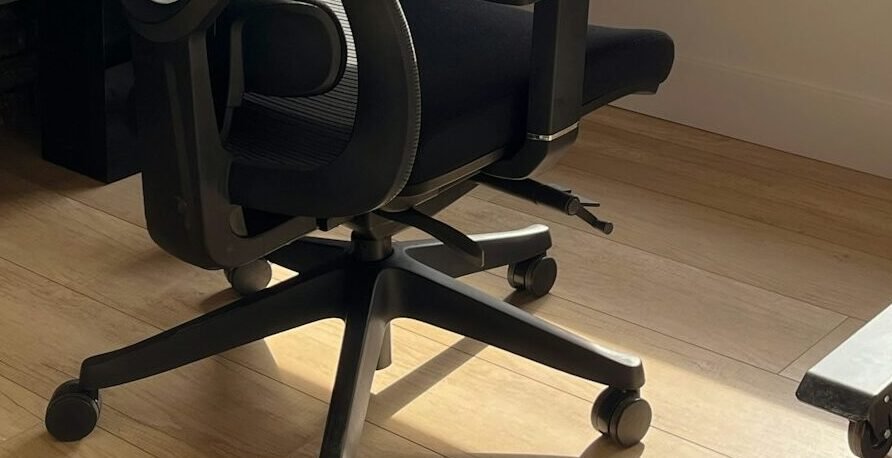
You’ll know it’s a mechanism problem if adjusting locks and tension does absolutely nothing, or if you hear grinding, clicking, or other concerning sounds when attempting to recline. In some cases, you might notice the chair tilts unevenly to one side. Unfortunately, a broken tilt mechanism usually means replacement rather than repair, though we’ll cover your options later.
Something’s Physically Blocking the Movement
This might sound obvious, but physical obstructions cause recline problems more often than you’d think. Cables from your computer setup or items stored under your desk could be preventing the chair from tilting properly.
Do a quick visual inspection of the area around and under your chair. Make sure cables aren’t wrapped around the chair base, that your ergonomic footrest isn’t positioned too close, and that nothing is wedged between the seat and the mechanism housing. Sometimes the simplest problems have the simplest solutions.
Step-by-Step Guide to Getting Your Chair Leaning Again
Now that we’ve covered the common issues, let’s walk through a systematic approach to diagnose and fix your office chair that won’t tilt back. Grab a flashlight if you have one handy, because we’re going under the seat.
Step 1: Check All Levers and Controls
Flip your chair around or crouch down to get a good view of what’s under there. Identify all levers, knobs, and paddles. Most chairs have two to four controls total. Try each one systematically, testing the recline after each adjustment.
The tilt lock usually operates with a simple on-off motion, while tension controls require multiple rotations. Don’t be shy about moving things through their full range. Sometimes a control gets stuck in an intermediate position that causes problems.
Step 2: Clean and Lubricate the Mechanism
Dust, debris, and dried lubricant can gum up the works over time. If you’ve confirmed all controls are in the right position but the chair still won’t recline smoothly, cleaning might help.
Use compressed air to blow out any dust from the mechanism housing. Then apply a silicone-based lubricant (WD-40 works, but silicone spray is better for long-term results) to any visible moving parts. Wipe away excess lubricant and test the recline. Sometimes this simple maintenance brings a chair back from the dead.
Step 3: Inspect for Visible Damage
While you’re down there with your flashlight, look for obvious signs of damage. Cracks in metal components, broken plastic pieces, or springs that look stretched out or detached all indicate hardware problems.
If you spot damage, assess whether it’s something you can fix with basic tools or if it requires professional attention. Small cracks might be reinforceable with metal epoxy, while a completely broken spring or cracked housing will need replacement parts.
Step 4: Test the Weight Distribution
Sometimes a chair won’t recline because the weight distribution is off. Try sitting in different positions and seeing if the chair reclines better when you’re seated more forward or back. If position makes a dramatic difference, your chair’s pivot point or spring tension might be misaligned.

This usually requires more advanced adjustment or repair, but identifying the issue helps you understand whether you’re dealing with a simple fix or something more complex.
When Your Office Chair Won’t Lean Back Anymore: Repair vs. Replace
So you’ve tried everything and your chair is still as rigid as a medieval throne. Now comes the big decision: fix it or replace it? Let’s break down your options.
Replacing the Tilt Mechanism
If you’ve identified a faulty mechanism, replacement parts are available for many popular chair models. Universal tilt mechanisms run anywhere from $20 to $80, though finding one that fits perfectly can be tricky. You’ll need to match the mounting pattern (the arrangement of screw holes) and ensure the mechanism supports your weight.
Replacing a tilt mechanism requires basic tools, usually just a screwdriver and wrench, and takes about 30 minutes. It’s definitely doable for anyone comfortable with simple furniture assembly. However, if your chair is a budget model that originally cost less than $100, buying a mechanism that costs $50-80 might not make financial sense.
Upgrading Components
Sometimes the problem isn’t catastrophic failure but rather that your chair’s components were never great to begin with. Consider this option if your chair is structurally sound and has features you love but just needs better reclining functionality. It’s like giving your chair a performance upgrade rather than just fixing what’s broken.
Knowing When to Say Goodbye
Some chairs just aren’t worth saving. If your chair is showing multiple signs of wear, torn upholstery, broken casters, wobbly base, on top of the recline problem, it might be time for a fresh start. Similarly, if the cost of repairs approaches 50% or more of a new chair’s price, replacement usually makes more sense.
Think about how long you’ve had the chair too. Most office chairs have a practical lifespan of 5-10 years depending on quality and use. If yours is approaching that age and developing problems, investing in a new chair with modern ergonomic features might serve you better in the long run.
Preventing Future Reclining Problems
Once you’ve got your chair leaning back smoothly again, let’s make sure it stays that way. A little preventive maintenance goes a long way toward avoiding future frustrations.
Regular Maintenance Schedule
Set a reminder every three months to perform basic chair maintenance. This includes tightening any loose screws, cleaning dust from the mechanism, and applying lubricant to moving parts. It takes about 10 minutes and can prevent most common issues before they become actual problems.
Pay special attention to the tension adjustment knob and tilt lock lever. These get the most use and tend to accumulate grime that can interfere with their operation. A quick wipe-down keeps them functioning smoothly.
Proper Usage Habits
How you use your chair matters more than you might think. Avoid “plopping” into your seat with full force, as this stresses the mechanism over time. When reclining, lean back gradually rather than throwing your weight backward suddenly.
If multiple people use the chair, establish some ground rules about adjusting it properly for each user. Having someone significantly heavier set the tension to maximum can make the chair unusable for lighter users, and vice versa.
Environmental Considerations
Your workspace environment affects chair longevity too. Excessive humidity can cause rust in metal components, while very dry conditions can make plastic parts brittle. Try to maintain a comfortable humidity level in your workspace, ideally between 40-60%.

Keep liquids away from your chair as much as possible. Spilled coffee seeping into the mechanism causes all sorts of problems, from sticky controls to corroded springs. If you do spill something, clean it up immediately and check under the seat to make sure nothing dripped into the mechanism housing.
What to Look for in Your Next Chair
If you’ve decided it’s time to replace your chair rather than repair it, let’s make sure you choose one that won’t develop the same problems. Not all office chairs are created equal, and knowing what to look for can save you from repeating this whole frustrating experience.
Mechanism Quality Indicators
The tilt mechanism is the heart of your chair’s reclining function, so don’t skimp here. Look for chairs that explicitly mention metal (preferably steel) tilt mechanisms rather than plastic. Heavy-duty mechanisms are rated for higher weight capacities and typically last longer.
Chairs with “synchro-tilt” mechanisms generally offer better ergonomic support than basic tilt designs. The synchro-tilt moves the seat and backrest at different ratios, maintaining proper positioning as you recline. It’s a feature worth paying extra for if you spend serious hours in your chair.
Adjustability Features
More adjustment options mean you can fine-tune the chair to your body and preferences. At minimum, look for adjustable seat height, tilt tension, and tilt lock. Better chairs add adjustable lumbar support, armrest height and width, and seat depth adjustment.
Don’t get overwhelmed by adjustment options you won’t use, but think about your specific needs. If you’re tall, seat depth adjustment becomes crucial. If you experience lower back discomfort, adjustable lumbar support is non-negotiable. Match the chair’s features to your actual requirements.
Build Quality and Warranty
A good warranty tells you a lot about manufacturer confidence in their product. Look for chairs with at least a 3-year warranty on the mechanism and other major components. Some high-end manufacturers offer 10-year or even longer warranties on certain parts.
Check customer reviews specifically for mentions of durability issues. If multiple reviews mention the same problem, like tilt mechanisms failing after six months, that’s a red flag to avoid that model. Pay attention to reviews from people with similar body types and usage patterns to yours.
Testing Before Buying
Whenever possible, try before you buy. Visit a showroom and actually sit in the chair, test all the adjustments, and recline multiple times. Pay attention to how smooth the recline feels and whether the tension adjustment has a wide enough range for your preferences.
If buying online, make sure there’s a reasonable return policy. Many reputable chair sellers offer 30-day trial periods because they know comfort is subjective. Don’t settle for a chair that doesn’t feel right just because returning it seems like a hassle.
FAQ
Why does my office chair lean back but won’t stay locked in position?
This usually means your tilt lock isn’t fully engaging or has worn out. Try pushing the lock lever firmly until you hear or feel a click. If the lever moves but doesn’t lock, the internal locking mechanism may be damaged and need replacement. Some chairs also have multi-position locks that require you to recline to a specific angle before locking engages.
Can I fix a broken chair spring myself?
It depends on the type of spring and your comfort with tools. Torsion springs that simply hook onto mounting points can be replaced with basic hand tools if you can source the right part. However, springs under tension in enclosed mechanisms are dangerous to work with and best left to professionals. Always release tension before attempting any spring-related repairs.
How much should I spend on a replacement office chair?
Expect to invest at least $200-300 for a chair with a reliable reclining mechanism that will last several years. Budget chairs under $100 often use plastic components that wear out quickly. Mid-range chairs ($300-600) offer the best value for most users, with quality mechanisms and decent adjustability. High-end ergonomic chairs ($800+) make sense if you have specific medical needs or spend 8+ hours daily at your desk.
Is it normal for my chair to feel stiff when I first try to recline?
Brand new chairs often feel stiff initially as the mechanism breaks in. The springs and moving parts need some use to smooth out. After a week or two of regular use, the recline should feel noticeably easier. If stiffness persists beyond the break-in period, try loosening the tension adjustment or applying lubricant to the mechanism.
My chair suddenly won’t lean back after I adjusted the height. What happened?
Height adjustment and tilt controls are sometimes located close together under the seat, making it easy to accidentally engage the tilt lock when reaching for the height lever. Check that your tilt lock lever didn’t get bumped into the locked position during your height adjustment. This is one of the most common causes of sudden recline failure.
Should I keep trying to force my chair to recline if it won’t move?
Absolutely not. Forcing a stuck mechanism can bend components, crack plastic housings, or cause sudden failure that could lead to injury. If your chair won’t recline after checking the tilt lock and tension settings, there’s likely a mechanical issue that requires proper diagnosis. Using excessive force will only make repairs more expensive.
Conclusion
Nobody should have to spend their workday wrestling with a chair that refuses to recline. Whether your office chair won’t lean back because of a simple locked lever or a more complex mechanical failure, you now have the knowledge to diagnose and fix the problem. Most issues really do come down to adjustment settings or basic maintenance rather than catastrophic failures.
Remember that your office chair is one of the most important tools in your workspace. It’s worth taking the time to fix it properly or invest in a quality replacement if needed. Your back, neck, and shoulders will thank you every single day. And hey, once you’ve got that recline working smoothly again, you’ve earned the right to lean back with a satisfied smile and appreciate your handiwork.
Looking for more? Check out our office furniture category for more articles and guides that may interest you!
Featured image credit: Photo by Vitaly Gariev on Unsplash
This content is for informational purposes only. Please verify current information directly on the retailer’s site before purchasing.